Discover Why the Logitech MX Master 4 is the Best Work Mouse Ever
In the world of computer peripherals, Logitech has long stood as a titan, continuously pushing the boundaries of innovation and design. Their latest offering, the MX Master 4, has been making waves in the tech community. This comprehensive MX Master 4 review delves into why this mouse is being hailed as the best work mouse ever, setting new standards for productivity and ergonomic design.
A Leap Forward in Design and Comfort
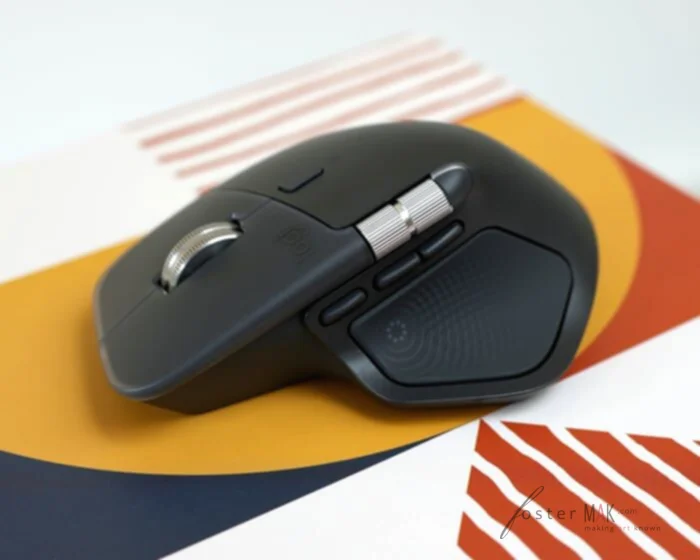
The design of the Logitech MX Master 4 is a testament to the brand’s commitment to user comfort and aesthetic appeal. Building on the success of its predecessors, the MX Master 4 features a sleek, sculpted shape that fits comfortably in the hand, promoting natural hand and wrist positioning. The mouse is crafted from high-quality materials, providing a premium feel that is both robust and lightweight.
One of the standout features of the MX Master 4 is its ergonomic design, which has been meticulously engineered to reduce strain during extended use. The thumb rest is thoughtfully placed, allowing for a relaxed grip, while the strategically positioned buttons enable easy access without unnecessary finger movement. This focus on ergonomics makes the MX Master 4 an ideal choice for professionals who spend long hours at the computer.
Advanced Functionality and Customization
The MX Master 4 is more than just a beautiful piece of hardware. It is equipped with advanced functionalities that cater to a wide range of professional needs. The mouse features a unique MagSpeed electromagnetic scroll wheel, which allows for ultra-fast scrolling through lengthy documents or web pages with precision. This feature can be toggled between ratchet and free-spin modes, providing users with flexibility depending on their task requirements.
Customization is another area where the MX Master 4 shines. Through the Logitech Options software, users can personalize button functions to suit specific workflows. This includes assigning shortcuts, adjusting pointer speed, and configuring gesture controls. The software also supports app-specific customizations, making it easy to switch between different tasks and applications seamlessly.
MX Master 4 Review: Performance and Connectivity
When it comes to performance, the MX Master 4 sets a new benchmark. The mouse is powered by Logitech’s Darkfield Tracking technology, which enables it to track on virtually any surface, including glass. This capability is particularly beneficial for professionals who frequently switch between different working environments.
The MX Master 4 also boasts an impressive battery life, capable of lasting up to 70 days on a full charge. It features fast charging capabilities, providing three hours of usage from just a one-minute charge. This ensures that users are not left stranded in the middle of important tasks due to a dead battery.
Connectivity options are abundant with the MX Master 4. It can connect via Bluetooth or the included USB receiver, and it supports multi-device pairing. Users can seamlessly switch between up to three devices with the touch of a button, enhancing productivity for those who work across multiple systems.
Exploring the User Experience
The user experience with the MX Master 4 is nothing short of exceptional. From the moment users unbox the mouse, they are greeted with a product that exudes quality and attention to detail. The setup process is straightforward, and the Logitech Options software is intuitive, providing a wealth of customization options without being overwhelming.
The tactile feedback from the buttons is satisfying, and the MagSpeed scroll wheel offers a smooth and responsive experience. The precision of the Darkfield Tracking ensures that cursor movement is accurate, making the mouse suitable for tasks that require high levels of detail, such as graphic design or video editing.
MX Master 4 Review: An Unmatched Tool for Professionals
For professionals seeking a mouse that enhances productivity without compromising on comfort, the MX Master 4 is a compelling choice. Its ergonomic design, coupled with its advanced features, sets it apart from other mice in the market. The ability to customize functionality according to specific needs makes it a versatile tool for a wide range of applications.
The MX Master 4’s performance in various professional settings has been met with praise. Whether in an office, a home setup, or on the go, the mouse adapts effortlessly, providing a consistent and reliable experience. Its ability to track on different surfaces and switch between devices with ease makes it particularly appealing for those who require flexibility in their workflow.
The Verdict from Experts
Tech reviewers and industry experts have lauded the MX Master 4 for its innovation and user-centric design. Many have highlighted its ergonomic benefits, noting that it significantly reduces the likelihood of repetitive strain injuries. The mouse’s customization options have also been praised, with users appreciating the ability to tailor the device to their specific needs.
Critics have noted that while the MX Master 4 comes with a higher price tag compared to other mice, the investment is justified by the superior performance and features it offers. The longevity and durability of the mouse further add to its value, making it a worthwhile purchase for professionals who prioritize quality and efficiency.
Beyond the Basics: Additional Features
In addition to its core features, the MX Master 4 includes several additional functionalities that enhance the overall user experience. The mouse is equipped with a gesture button that allows for quick access to common commands, such as switching desktops or opening specific applications. This feature is particularly useful for users who want to streamline their workflow and minimize interruptions.
The MX Master 4 also supports Logitech Flow technology, which enables seamless control across multiple computers. Users can move the cursor between devices as if they were using a single system, allowing for efficient file transfers and multitasking. This is especially beneficial for professionals who work with multiple machines simultaneously.
The Logitech MX Master 4 stands as a testament to the company’s dedication to innovation and user satisfaction. Its combination of ergonomic design, advanced features, and exceptional performance makes it an unparalleled choice for professionals seeking the best work mouse available today.